
Hi friends,
We’re sharing this Cute As A Button Desk Name Tag for our designated work space, to add personalization and ownership, while our son adjusts to online schooling. Check it out below, it is SO EASY!
*Click on photos for closer look
What You'll Need
Cardboard
Craft Paint- any color
Paint Brush
Pencil
Glue
Buttons- any color
Optional: Table Cover/Newspaper, beads, penny’s, bottle caps, dry pasta, twigs, flowers, seashells, ect
The Steps
We want to see your craft! Click PHOTO SUBMISSION, then submit the photo.
NOTE: We started online schooling about two weeks ago, and need a specified area to work on homework. We’ve got new teachers, subjects, and glitches that come with it. But, we’re choosing a CAN DO attitude and lots of grace.
This year, the older kids have a spot in the dining room, and Micah has a little corner to himself. It’s made a big difference in everyone’s attitude and output. Thanks to a recent 1st-grade assignment, it gave us the inspiration for today’s craft.



PREP
Cut the cardboard down to the size needed.
Paint the cardboard in your color of choice and let it dry for about five minutes. (Optional: lay down a table cover/newspaper to protect your workspace.)
NAME
Use a pencil to write the name out.
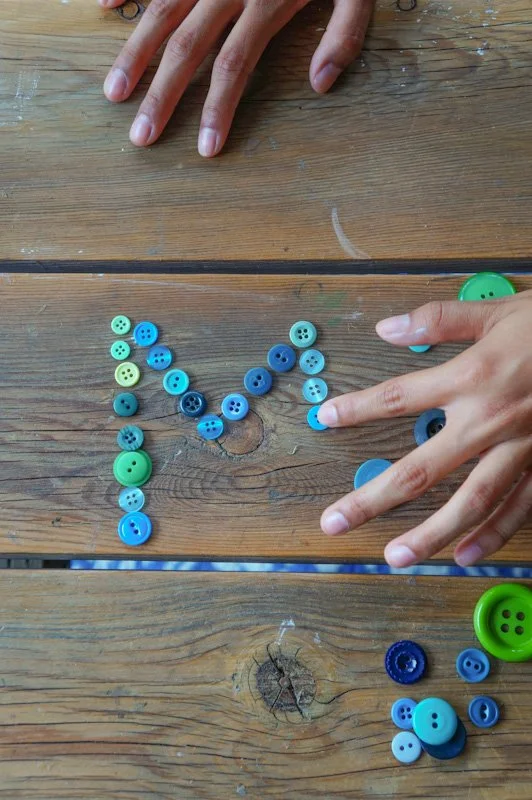
Gather all your buttons or beads, pasta, bottle caps, seashells, etc.
This is a great opportunity for your little one to decide on individual colors for each letter, choose a certain size or direction of the item, etc. It’ll give them sorting practice.
Go over one letter at a time with the glue.
I have a LOT of buttons, they were passed on from my Grama B, and some I collected over the years.
Micah chose the blues and greens. He also chose Mom and Naomi to complete this without him. It was too similar to the homework he was assigned LOL = )


My three-year-old had no problem helping out. He did so well.
DECORATE
Start adding the items to each letter and continuing with more glue and items.
Let everything dry for 20 minutes.
That’s it!


Here is Micah’s workspace.
Happy crafting and well wishes for your school year!
Amanda and Naomi
To share: take a photo of your craft and let us see it! Click on photo submission and submit the photo.